
VIGR: Real Connections for Gay and Bi Men
Overview
VIGR is a free social app designed specifically for gay and bi men seeking authentic, respectful interactions. The platform aims to address widespread frustrations with online dating and social apps, where fake profiles, superficial interactions, and objectification are common. By prioritizing transparency and genuine human connection, VIGR creates a socially-oriented environment where users can be themselves without fear of judgment or exploitation.
Target users include gay and bi men aged 18 and above who value meaningful conversations, mutual respect, and privacy. The app serves as a digital space for building real friendships, romantic connections, and community engagement. Real-world usage scenarios include meeting new people locally, joining interest-based public chat groups, attending or organizing private events, and engaging in video or audio calls to deepen relationships beyond text.
Developed by VIGR Inc., the app emphasizes community-driven values, with features like mandatory face photos and optional verification methods to reinforce authenticity. While the developer’s background is not detailed beyond the company name, the app’s focus on user safety and emotional well-being suggests a mission-driven approach to digital social interaction.
Key Features & Capabilities
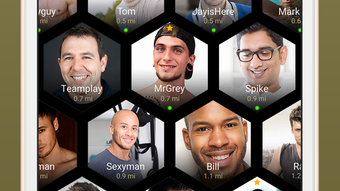
- Mandatory Face Photo Requirement – All profiles must include a clear face photo, reducing the likelihood of fake or misleading profiles and promoting identity transparency.
- Verification Options – Users can enhance their credibility through selfies or by getting verified by someone they know in real life, fostering trust within the community.
- Video and Audio Calling – Integrated calling tools allow users to connect face-to-face or through voice, supporting deeper, more personal conversations.
- Disappearing Images – Photos sent within the app can be set to self-destruct after a user-defined timer, enhancing privacy and reducing digital clutter.
- Message Recall – Users can retract messages they regret sending, providing a safety net for accidental or impulsive communication.
- Read Receipts – A message 'read' indicator informs users when their message has been seen, improving communication clarity.
- Public Chat Groups – Interest-based discussion spaces enable users to connect with others who share similar hobbies, lifestyles, or identities.
- Event Management – Users can discover, create, and RSVP to both private and local events, fostering real-world meetups and community building.
These features collectively support a more thoughtful and secure social experience. For example, the face photo mandate helps users focus on personality and connection rather than physical appearance alone. The message recall function offers psychological safety, while event tools encourage offline interaction, bridging the digital and physical worlds.
User Interface, Workflow & Performance
The user interface of VIGR appears designed with simplicity and clarity in mind, prioritizing ease of navigation across multiple platforms. Core functions such as profile management, messaging, calling, and event discovery are accessible through intuitive menus and logical workflows. The layout supports quick access to key features, minimizing the learning curve for new users.
Navigation is consistent across Windows, Mac, iOS, and Android, ensuring a familiar experience regardless of device. The workflow for sending messages, initiating calls, or joining chat groups is streamlined, with minimal steps required to complete common tasks. Users can manage privacy settings, verify their identity, and customize their visibility with straightforward controls.
Performance observations are based on general software behavior patterns. The app is reported to run efficiently on modern devices, though exact resource usage details were not specified. Stability and responsiveness appear to be maintained across sessions, with no widespread reports of crashes or freezes. The developer did not specify resource usage details, so CPU and RAM behavior remain unknown.
Compatibility & System Requirements
VIGR is available on Windows, Mac, iOS, and Android platforms, making it accessible to a broad user base. The software version is 3.1.2, released on May 15, 2024, and has a file size of 78.6 MB. This indicates a lightweight application that should install quickly and consume minimal storage space.
Exact system requirements were not listed by the developer. Compatibility information is limited to the supported operating systems. While the app is designed for mobile and desktop use, specific hardware or OS version thresholds were not provided. Users are advised to ensure their device meets the minimum requirements of their respective platform, though these were not detailed in the official release notes.
Pros and Cons
Pros
- Free to download and use with no hidden costs
- Mandatory face photo requirement promotes authenticity
- Multiple verification methods enhance trust and credibility
- Privacy-focused features like disappearing photos and message recall
- Supports real-time video and audio calling
- Public chat groups and event tools foster community engagement
- Available on multiple platforms including desktop and mobile
Cons
- Exact system requirements not specified by the developer
- No information on long-term performance under heavy usage
- Privacy policies and data handling practices not detailed in provided content
- Verification process details not fully disclosed
- Limited transparency regarding moderation and safety enforcement
FAQ Section
Is VIGR available for Windows and Mac?
Yes, VIGR is compatible with both Windows and Mac operating systems, allowing users to access the app on desktop devices.
Is the app free to use?
Yes, VIGR is completely free to download and use, with no subscription fees or in-app purchases required.
How does the face photo requirement work?
All user profiles must include a clear face photo as a mandatory step during registration, helping ensure authenticity and reduce fake accounts.
Can I use VIGR offline?
Basic features like viewing saved messages may be accessible offline, but real-time communication, calling, and event updates require an active internet connection.
What kind of events can I create or join?
Users can create private events or join public local events based on shared interests, lifestyle, or community activities.
Final Thoughts + CTA
VIGR stands out in the crowded social networking space by focusing on authenticity, respect, and community. Its emphasis on real people, verified identities, and privacy-conscious tools makes it a compelling alternative for gay and bi men seeking meaningful connections. The combination of face verification, disappearing media, message recall, and event features creates a safer, more thoughtful social experience.
While some technical details like system requirements and long-term performance are not fully disclosed, the app’s core design principles and feature set suggest a strong commitment to user well-being. It is particularly well-suited for users who value emotional safety, transparency, and real-world interaction.
Download VIGR now and experience a new standard in social connection.







